
Free Amazon ASIN Finder
Search Amazon by keyword and get up to 10 matching products with their ASINs, images, prices, ratings, and Prime status.
Free Amazon product search built for affiliate marketers.
Why affiliates use this ASIN Finder
From a single keyword to ten ready-to-promote ASINs
Find ASINs without leaving your tab
Search any Amazon keyword wireless mouse, kitchen scale, running shoes and grab 10 matching ASINs in one click, with thumbnail, price, rating, and Prime status.
Built for product round-ups
Researching a top-10 review post or comparison table? Get every product you need in seconds instead of opening 10 Amazon tabs and copy-pasting URLs.
Spot Prime products at a glance
Prime-eligible items convert better for affiliates. Each finder result shows Prime status so you can pick the strongest products for your reviews.
All 12 Amazon marketplaces
Switch the marketplace dropdown to find ASINs on amazon.co.uk, amazon.de, amazon.ca, amazon.fr, amazon.it, amazon.es, amazon.co.jp, amazon.in, and more.
One-click affiliate workflow
Each result has a Generate Affiliate Link button that jumps to the Amazon Affiliate Link Checker with the product URL pre-filled.
Free, no Amazon API quota
No Amazon Product Advertising API key, no Associates account, no signup. Search and find ASINs without consuming any official Amazon API quota.
What AffiliateX builds for you
The free ASIN Finder is one tool. AffiliateX gives you the entire conversion-optimized block library Amazon affiliates use to grow revenue.
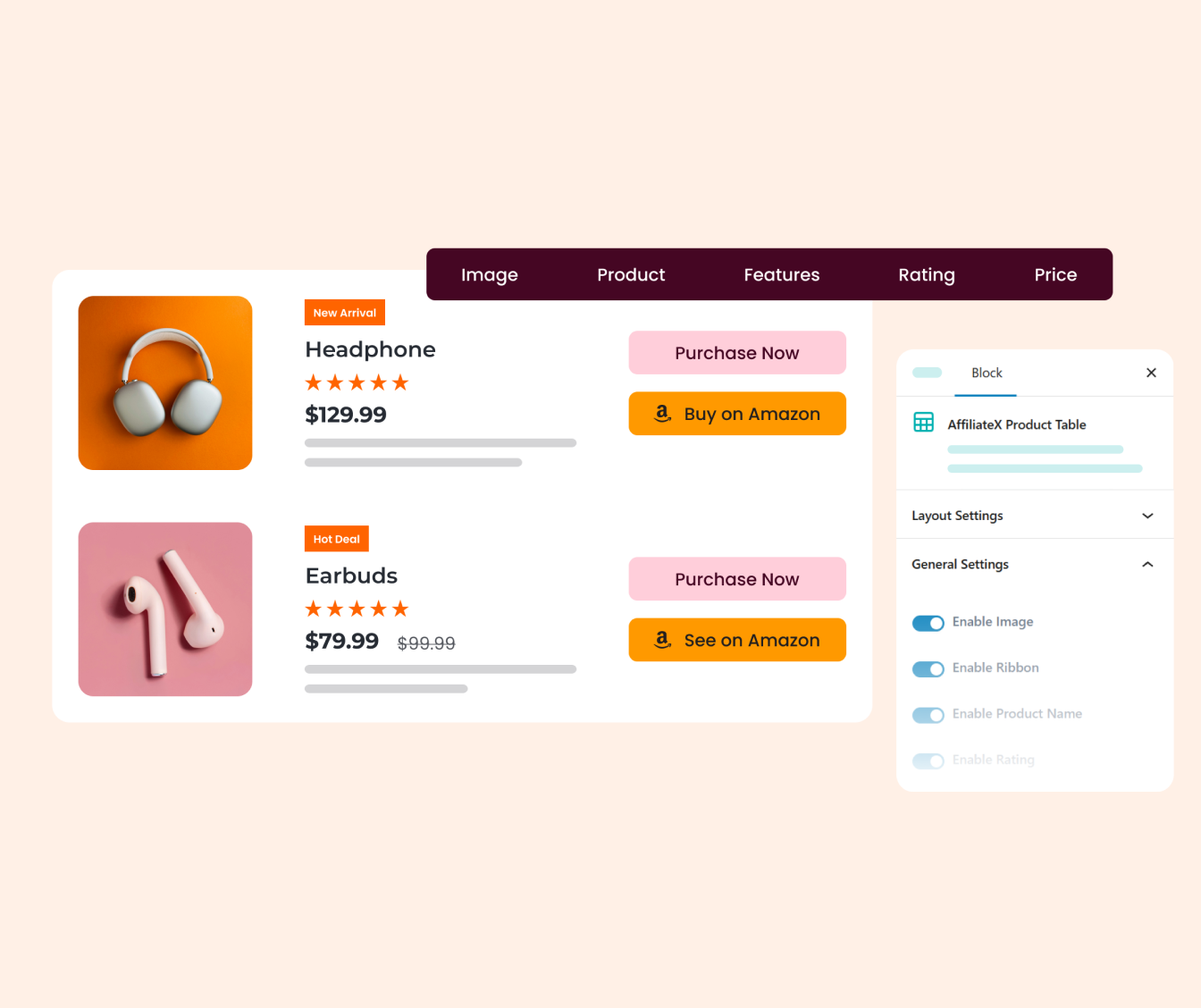

Product Table
Maximize your click-through rates by presenting multiple products in a high-impact comparison layout.
The AffiliateX Product Table block simplifies the user experience, allowing readers to evaluate features, ratings, and pricing side-by-side.
Key Features
- Side-by-Side Comparison: Enable readers to evaluate multiple items at a glance.
- Flexible Architecture: Fully customizable rows and columns to fit any product data.
- Responsive Design: Optimized to ensure tables remain perfectly legible on mobile devices.
- Conversion-First UI: Integrated CTA buttons and badges designed to drive immediate action.

Single Product
AffiliateX provides a dedicated Single Product block designed to showcase individual items with professional precision.
This block organizes key specifications, pricing, and ratings into a high-converting layout. By providing clear, structured information, you reduce friction and help your audience make faster purchasing decisions.
Key Features
- Flexible Design: Match the layout perfectly to your site’s branding.
- Pricing Clarity: Highlight current prices and active discounts.
- Social Proof: Integrated star ratings to build immediate trust.
- Optimized CTAs: Multiple button styles built for higher clicks.

Dynamic Listing
Drive more sales by showcasing the products your audience is already looking for. The Dynamic Listing block allows you to pull real-time product feeds such as “Best Sellers,” “Most Rated,” and “New Arrivals” directly into your content.
Instead of manual curation, this block bring products automatically and uses live data to ensure your recommendations are always relevant and trending.
Key Features
- Live Product Feeds: Display trending Best Sellers and Top Rated items.
- Smart Filtering: Sort products by popularity or customer ratings.
- Amazon Optimized: Designed to leverage high-trust data for more clicks.
- Automatic Updates: Ensure your listings stay current and accurate.

Product Comparison
Help your readers make the right choice with a professional comparison block. The Product Comparison block allows you to place two or more products side-by-side to highlight their differences and advantages.
Instead of forcing readers to jump between tabs, you provide all the necessary data in one cohesive view.
Key Features
- Side-by-Side View: Compare features and specs instantly.
- Highlight Winners: Clearly mark the best-in-class products.
- Custom Data Points: Add specific rows for any product detail.
- Responsive Layout: Perfectly readable on mobile and desktop.

Coupon Listing
Give your readers an immediate reason to click by showcasing the best deals and exclusive offers. The Coupon Listing block is designed to present promotional codes and discounts in a high-visibility format that captures attention.
This block is an essential tool for holiday sales, seasonal promotions, or niche-specific deal pages.
Key Features
- Exclusive Layouts: Clean designs focused on deal visibility.
- Copy-to-Clipboard: One-click code copying for better UX.
- Urgency Triggers: Highlight expiration dates and deal status.
- Direct CTAs: Integrated buttons to send users straight to checkout.

Rating Box
Provide a definitive summary of your findings with the Rating Box block. This tool allows you to condense complex reviews into a single, authoritative snapshot that highlights the bottom line.
It is the perfect finishing touch for any review, ensuring your expert opinion is the most prominent element on the page.
Key Features
- Multi-Criteria Scores: Rate specific features like quality or value.
- Visual Breakdown: Easy-to-read bars or stars for instant clarity.
- Summary Verdict: Highlight the final conclusion in a bold box.
- Trust Indicators: Professional styling that boosts review authority.

Top Product
Guide your readers to the best options on the market with a high-impact “Top Picks” showcase.
This block is the ultimate conversion tool for “Best of” guides, allowing you to award specific titles like “Best Overall” or “Best Value.”
Key Features
- Featured Badges: Highlight winners like “Best Overall” or “Best Value.”
- Ranked Listings: Clearly organize products by performance or preference.
- Compact Summary: Display key pros and cons in a scannable format.
- Quick-Action CTAs: Optimized buttons to drive instant merchant visits.

Verdict
Verdict block allows you to summarize your final thoughts into a concise, professional “bottom line” that readers can find at a glance.
It is the perfect tool for closing your articles, ensuring your expert opinion isn’t lost in the text. Use it to provide a structured “Final Word” that reinforces your expertise and simplifies the path to conversion for your audience.
Key Features
- Final Score Display: Show an overall rating for instant impact.
- The Bottom Line: A dedicated space for your expert conclusion.
- Structured Pros/Cons: Quickly recap the most critical details.
- Actionable Layout: Bold design that stands out at the end of posts.

Pros And Cons
Show the advantages and disadvantages of a product in a clear and structured way. The Pros & Cons block helps your readers quickly understand what’s good and what’s not without reading long paragraphs.
By presenting both sides side by side, you make it easier for users to compare and decide, which leads to more confident clicks on your affiliate links.
Key Features
- Side-by-Side Layout: Display pros and cons in a simple, easy format.
- Faster Decisions: Help users evaluate products quickly at a glance.
- Clear Structure: Break down information without overwhelming the reader.
- Customizable Style: Adjust colors, icons, and layout to fit your site.

Call to Action
The AffiliateX Call to Action block comes with a ready-made structure of headline, description, and buttons that work together to increase conversions.
With the right combination of a strong headline and well-placed buttons, you can guide visitors toward the next step without distraction and turn more clicks into actual results.
Key Features
- Highly Customizable: Adjust colors, layouts, and styles to match your brand perfectly.
- Multiple Button Styles: Pick from pre-designed buttons built to maximize clicks.
- Interactive Elements: Add images and icons to make your CTAs more engaging.
- Seamless Link Integration: Connect directly to affiliate links, landing pages, or offers.

Single Coupon
The AffiliateX Single Coupon block puts one offer front and center, combining a brand logo, discount details, coupon code, and CTA button into a single eye-catching layout.
By focusing on one featured deal at a time, it helps you drive attention to your best promotions and make it easy for visitors to grab the offer without distractions.
Key Features
- Coupon Code: Display the offer value and code clearly for quick action.
- Brand Support: Add a brand image to build instant recognition and trust.
- Urgency Tags: Use labels like “Limited Time” or “Exclusive Deal” to drive faster clicks.
- Customizable CTAs: Style “Activate Deal” or “Redeem Now” buttons to match your brand.

Notice
The AffiliateX Notice block provides a ready-made structure of title, icon, and message area that makes important information stand out from the rest of your content.
With predefined styles for warnings, tips, offers, and announcements, you can draw attention to time-sensitive deals or key details that your readers shouldn’t miss and keep them engaged with your page.
Key Features
- Coupon Code: Display the offer value and code clearly for quick action.
- Brand Support: Add a brand image to build instant recognition and trust.
- Urgency Tags: Use labels like “Limited Time” or “Exclusive Deal” to drive faster clicks.
- Customizable CTAs: Style “Activate Deal” or “Redeem Now” buttons to match your brand.

Specifications
The AffiliateX Specifications block presents product details in a clean, table-based structure that makes technical information easy to read at a glance.
By laying out key facts like brand, dimensions, and features in an organized format, you help visitors compare products faster and make confident buying decisions without digging through long paragraphs.
Key Features
- Coupon Code: Display the offer value and code clearly for quick action.
- Brand Support: Add a brand image to build instant recognition and trust.
- Urgency Tags: Use labels like “Limited Time” or “Exclusive Deal” to drive faster clicks.
- Customizable CTAs: Style “Activate Deal” or “Redeem Now” buttons to match your brand.
Found the products. Now publish them in minutes.
AffiliateX is the WordPress plugin that turns ASINs into conversion-optimized blocks and tracks every click. Paste your finder results and publish a polished round-up the same day.
Proven Results, Happy Affiliates
Real feedback from affiliate marketers who replaced manual ASIN work with AffiliateX.
How to use the ASIN Finder
Three steps from a keyword to ten promotable ASINs
Type a keyword or product name
Drop any search phrase into the field above wireless mouse, electric kettle, hiking shoes and pick the marketplace.
Review the top 10 matching products
Each result shows the thumbnail, ASIN, title, price, rating, and Prime status. Copy any ASIN with one click.
Generate affiliate links for the winners
Click Generate Affiliate Link on the products you want to promote you will be taken to the Amazon Affiliate Link Checker with the product URL pre-filled.
Amazon ASIN Finder Common Questions
Everything Amazon affiliates ask about searching Amazon by keyword and using the results in affiliate content.
What is an Amazon ASIN finder?
An ASIN finder is a tool that searches Amazon by keyword and returns matching products with their ASINs, images, and prices. Affiliates use it to research round-up posts, comparison tables, and reviews without manually browsing Amazon and copy-pasting ASINs from URLs.
How do I find an Amazon ASIN by keyword?
Type the product keyword — wireless mouse, kitchen scale, running shoes into the field above and click Find ASINs. The tool returns up to 10 matching products with their ASIN, title, image, price, rating, and Prime status.
How is the ASIN Finder different from the ASIN Lookup?
The ASIN Finder takes a keyword and returns multiple matching products. The ASIN Lookup takes a single Amazon URL and extracts the ASIN from it. Use the finder when you do not have a specific product URL yet.
Which Amazon marketplaces can I search?
All 12: amazon.com, amazon.co.uk, amazon.de, amazon.ca, amazon.fr, amazon.it, amazon.es, amazon.co.jp, amazon.in, amazon.com.au, amazon.com.mx, and amazon.com.br. Switch marketplaces using the dropdown next to the search field.
How many results does the finder return?
Up to 10 products per search, ranked by Amazon own search relevance. For more results or for filters like price range, rating threshold, or category install the AffiliateX WordPress plugin: it taps the official Amazon Product Advertising API for full-power product search.
Is this Amazon ASIN search free?
Yes, completely free. No Amazon Associates account, no Product Advertising API key, no email. There is a per-IP rate limit (20 searches per hour) to prevent abuse, but normal affiliate research never approaches it.
Can I filter finder results by Prime, price, or rating?
This free version returns the top 10 results without filters. For advanced search Prime-only, price range, rating threshold, category install AffiliateX, which includes a full Amazon search with filters and Save-to-Library to reuse products across pages.
Why are some finder results missing prices or ratings?
Amazon serves slightly different markup based on rate limits and region. The ASIN, title, and image always come through, but price and rating can occasionally be absent. Try the ASIN Lookup tool with the product URL for a more complete fetch.
How do I turn finder results into affiliate links?
Click Generate Affiliate Link on any result you will be taken to the Amazon Affiliate Link Checker with the product URL pre-filled, where you can confirm your Amazon Associates tracking ID is correctly attached.