
Best Practices for Adding Amazon Affiliate Disclosures with AffiliateX
Amazon Affiliate Program (Amazon Associates) has strict rules for promoting Amazon products and earning commissions on purchases made through affiliate links. Amazon Affiliate Program has revolutionized affiliate marketing, offering a seamless process for anyone to start earning commissions. With millions of products available for promotion, it’s an easy way to get started in affiliate marketing. However, it’s vital to maintain transparency and legal compliance, especially in affiliate disclosures.
Affiliate disclosures are essential for maintaining transparency with your audience. They inform readers that the links in your content are affiliate links, meaning you could earn a commission if they make a purchase. Not only is this a best practice, but it’s also a legal requirement in many regions, including the U.S., under the Federal Trade Commission (FTC) guidelines. In this guide, you will learn best practices for adding Amazon affiliate disclosures with AffiliateX, the best affiliate marketing plugin for WordPress users that helps them maintain rules and compliance automatically and stay up to date by earning the maximum product commission in an interactive way.
How to define Amazon Affiliate Disclosures
If you are an affiliate marketer promoting Amazon products, you have likely encountered the term “Amazon Affiliate Disclosures.” But what exactly does it mean, and why is it so important?
Simply put, Amazon affiliate disclosures are statements that you must include on your content to inform your audience that you are using affiliate links. These links allow you to earn a commission if they purchase them. The purpose of these disclosures is two-fold: to ensure legal compliance and to build trust with your audience.
In this post, you are going to have a breakdown of what Amazon affiliate disclosures are, why they are crucial for your business, and how to integrate them into your content effectively. Let’s dive into everything you need to know about staying transparent and compliant with Amazon’s affiliate program.
Why are Amazon Affiliate Disclosures Important
Amazon, like many other affiliate programs, has specific guidelines for how its affiliates should operate. This includes disclosure rules that protect consumers and ensure they are fully aware when they are clicking on affiliate links. Here’s why affiliate disclosures are a must:
- FTC Compliance: In many countries, including the U.S., affiliate marketers are legally required to disclose their affiliate relationships with companies. The Federal Trade Commission (FTC) requires any affiliate marketer to clearly disclose when they have a financial interest in the products they recommend.
- Building Trust: Disclosures aren’t just for legal reasons. They help foster transparency and trust. When your audience knows you can earn a commission from a link, they are more likely to appreciate your honesty and feel comfortable clicking through. Trust is the foundation of any successful affiliate marketing business.
- Amazon’s Policy: Amazon requires its affiliates to clearly disclose their affiliate status to maintain good standing in its affiliate program. Failure to do so can result in penalties, including removal from the program.
Types of Amazon Affiliate Disclosures for Different Content
Blog Posts with Multiple Affiliate Links
When you have multiple affiliate links in a single blog post, it’s essential to ensure that each link is adequately disclosed. The best practice is to place a general disclosure at the beginning and reinforce it throughout the post near the affiliate links.
Product Review Pages
Product review pages require a special disclosure due to the nature of the content. The recommendation aspect of these posts means that a clear, conspicuous disclosure is crucial.
Video Content and Social Media
For platforms like YouTube, Instagram, and TikTok, it’s essential to not only add disclosures in the description but also mention them verbally in the video itself. This guarantees that your viewers are aware of the affiliate links.
Why Use AffiliateX for Adding Amazon Affiliate Disclosures to an Affiliate Site
AffiliateX is the best Amazon affiliate plugin for WordPress Gutenberg and Elementor users. AffiliateX makes the Amazon affiliate site disclosure easy to manage. It automates the process, ensuring you stay compliant with Amazon’s guidelines without manually updating product data each time.
The key rule is keeping Amazon affiliate product data accurate. You can not manually list static prices or images. Instead, use the Amazon Product Advertising API through AffiliateX to automatically update titles, prices, and images in real time.
You should keep your store well-maintained by regularly checking links, updating plugins, and staying up to date on Amazon’s policies. Staying compliant is key to avoiding account suspension and ensuring your store remains profitable and sustainable with AffiliateX.

Benefits of AffiliateX for Adding Amazon Affiliate Disclosures
- Escalate Earnings with Optimized Product Links: By automating affiliate link insertion and updating prices, AffiliateX ensures you’re always promoting the most current and relevant products, leading to higher conversions.
- Boost Conversion Rates: With customizable widgets and intelligent linking, AffiliateX makes it easy to display Amazon products in a way that attracts visitors and encourages them to click on your affiliate links.
- Seamless Link Management: AffiliateX handles the addition, updating, and tracking of affiliate links. It means you can spend more time creating content and growing your business.
- Time-Saving: The plugin automates many time-consuming tasks, such as creating links and updating prices, saving you valuable time.
Best Practices for Adding Amazon Affiliate Disclosures with AffiliateX: Step-by-Step Guide
In affiliate marketing, especially when promoting Amazon products, maintaining transparency with your audience is crucial. One of the most important ways to ensure transparency is to include affiliate disclosures. AffiliateX is a powerful tool that simplifies adding these disclosures, ensuring you are compliant with Amazon’s policies and the FTC’s guidelines.
In this guide, we will walk you through the best practices for adding Amazon affiliate disclosures with AffiliateX, including step-by-step instructions and ready-to-use blocks.
Get Started With AffiliateX!
Your Ultimate Amazon Affiliate Marketing Solution for WordPress.
Step 1: Install AffiliateX Plugin
To get started, install and activate AffiliateX, a plugin that automates and is compatible with Amazon affiliate disclosures on your website.
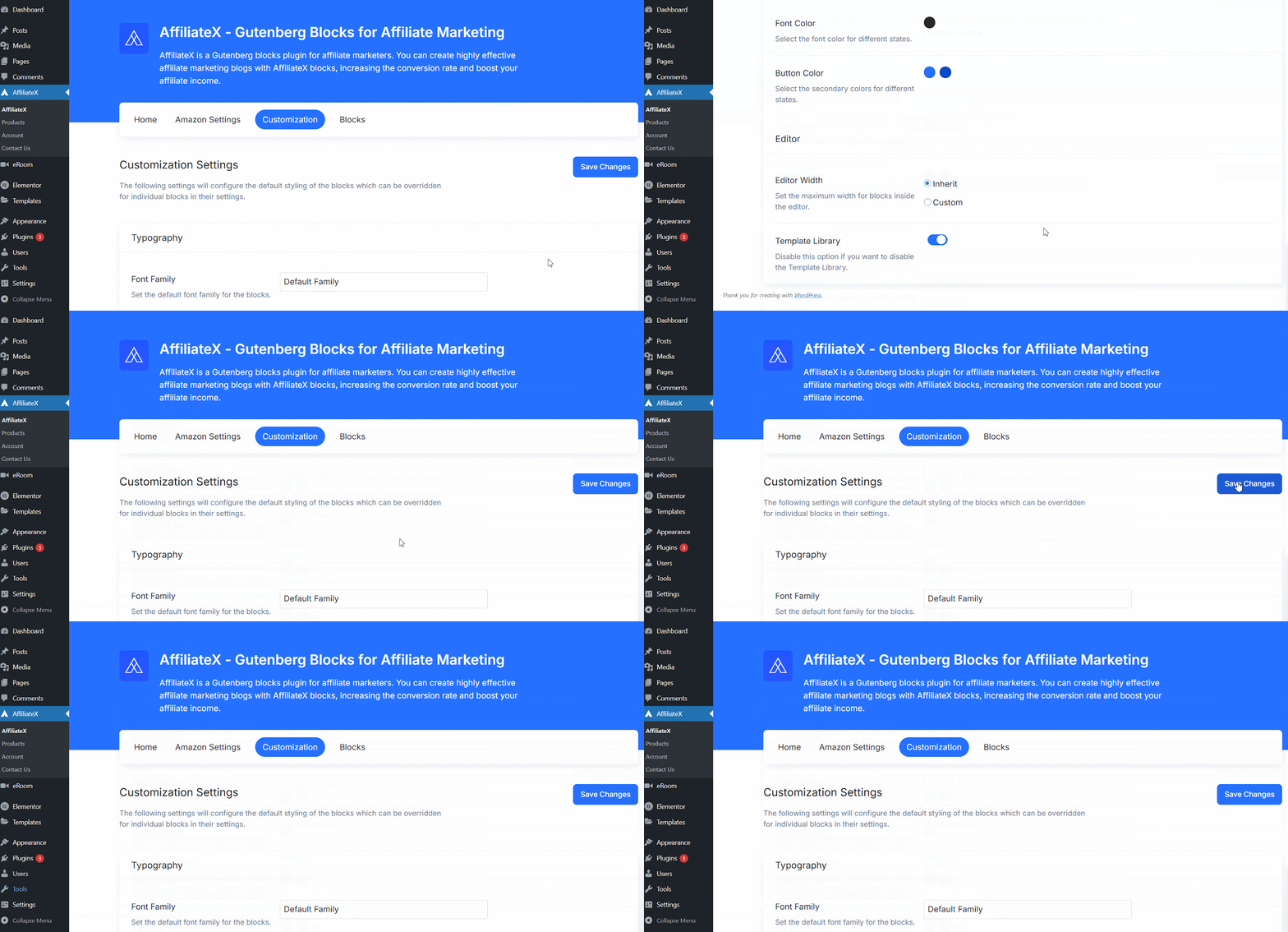
Afterwards, you need to configure the settings and get started. To configure your settings, start by going to AffiliateX → Customization. This Amazon affiliate solution is fully compatible with Gutenberg and Elementor Editor. This plugin is compatible with any WordPress theme and is easy to manage.
Step 2: Connect Your Amazon Associates Account
This stage is a vital step for Amazon Affiliates, as it helps you collect commissions. Now you need to connect your WordPress site with your Amazon Associates account.
Note: If you haven’t already, sign up for the program at the Amazon Associates website. It’s free and just takes a few minutes. Once approved, you will gain access to your account dashboard, where you can generate affiliate links and retrieve your API keys.
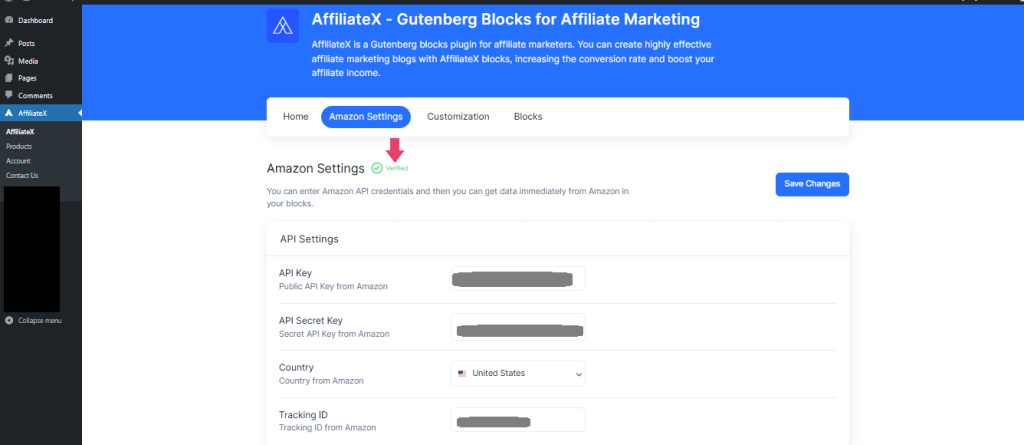
These keys allow AffiliateX to pull real-time product data like product links, titles, images, and prices directly from Amazon. AffiliateX helps ensure your store remains compliant with Amazon’s guidelines.
In WordPress, navigate to the AffiliateX Settings, enter your API credentials, and click on the ‘Save Changes’ button to continue.
Your site is now officially linked to Amazon, enabling you to add products seamlessly without manual updates or formatting.
Step 2: Use Ready Blocks for Affiliate Disclosures in Your Content
AffiliateX provides ready-made blocks compatible with Amazon affiliate disclosure that you can easily insert into your website content, blog posts, or product review page designs. These blocks are customizable, so you can configure them to your needs while ensuring compliance. Here’s how to use them:
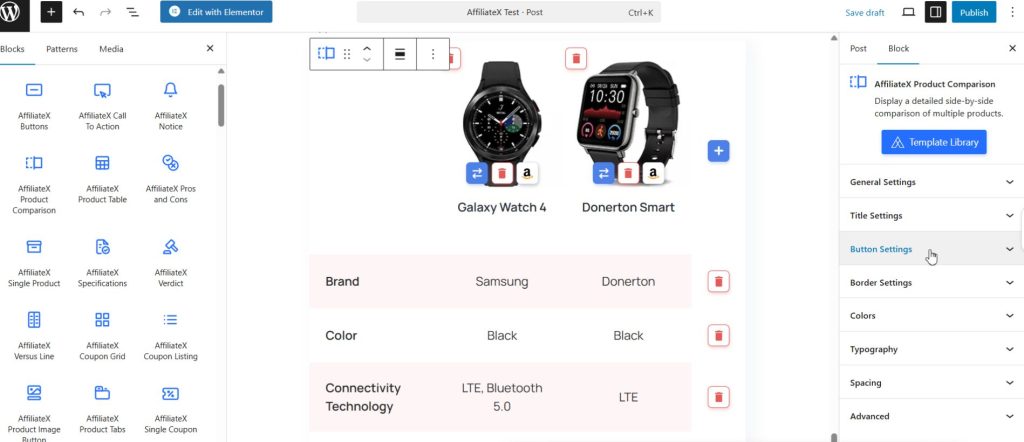
Open a Post or Page, then navigate to the post or page where you want to add these ready blocks compatible with Amazon affiliate disclosures. You can add a Dynamic Listing, Product Comparison Table, Notice, Product Table, or other elements to your affiliate blogs or website in the required areas to boost your affiliate commission during the sales period or at any time.
In addition, you can use ready-made templates for each block, so you can pick your favourite layout and start designing your Amazon affiliate product link site without starting from scratch.
However, you can now automatically add product data by connecting to the product API and configuring product updates with ease, ensuring compliance with Amazon Affiliate Program rules. You can check out this detailed documentation to learn more about how to use Amazon API in the Gutenberg Editor using AffiliateX.
Learn More: AffiliateX + Elementor: The Affiliate Marketing Combo You’ve Been Waiting For
This is where you bring your product data to life within your content. In any WordPress post or page, click the + icon and search for the AffiliateX Dynamic Listing block. Right there, you have the option to choose the AffiliateX Dynamic Listing template library, ready templates, and start your configuration.
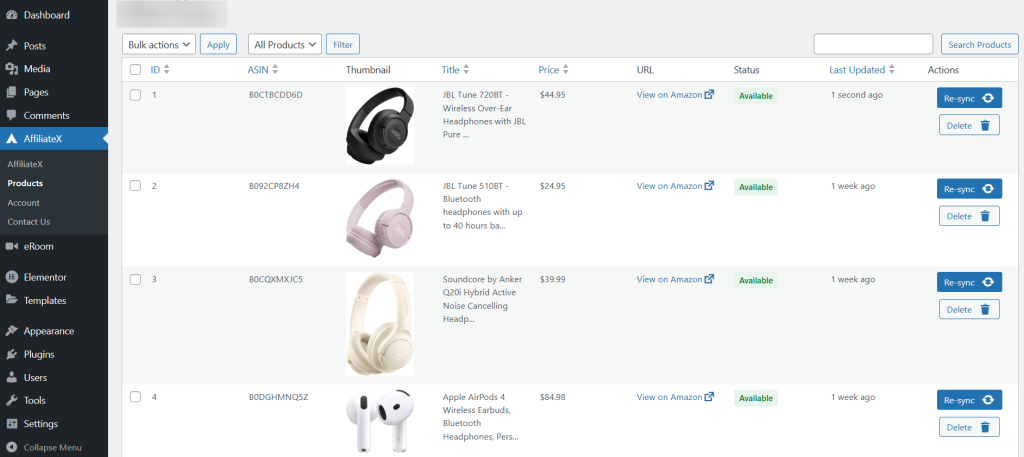
Now, navigate to the Sort by section and select a drop-down option, such as Best-Selling Products or Featured Products. Afterwards, configure the Search Keywords section and provide the correct keyword. For instance, here, “wireless headphones” is the keyword, and it automatically fetches data and sorts by Featured.
You will see that the AffiliateX Dynamic Listing block automatically tracks data and updates the layout with the required information. You can also choose Layout Style, Number of Products options, and other effects to make the AffiliateX Dynamic Listing block interactive.
This way, you can similarly drag and drop the AffiliateX Product Comparison Table block to highlight your sales product affiliate links and boost sales.
You can effortlessly create informative, attention-grabbing notices using the AffiliateX Notice Block in your post or page. This versatile block helps highlight important information, promotions, disclaimers, or any other content you want your audience to notice.

Step 3: Rules and Compliance for Amazon Affiliate Sales With AffiliateX
As we already know, rules and compliance are non-negotiable, and violating rules during high-traffic periods puts your Amazon affiliate account at risk of termination. This is why AffiliateX offers this exclusive facility that fully complies with Amazon’s affiliate program rules, so affiliates can focus on running their affiliate marketing with ease without worrying about maintenance.
Below, review the rules and compliance for Amazon affiliates and the AffiliateX advanced strategy that applies to it.
Rule | Requirement for Compliance | AffiliateX Relevance |
Disclosure (FTC & Amazon) | Clearly and prominently state your affiliate relationship before any link is clicked. The required language is: “As an Amazon Associate, I earn from qualifying purchases.” This cannot be buried in a footer or a privacy policy. | Use AffiliateX’s dedicated disclosure field on product boxes and at the top of guides to ensure visibility. |
No Price Listing | Strictly prohibited from manually listing a product’s price or availability. All pricing and availability must be automatically retrieved via the Amazon API to ensure real-time accuracy. | AffiliateX Pro blocks use the official Amazon API, ensuring compliance by automatically displaying real-time prices. Avoid using custom text in blocks that imply a price. |
Link Usage | Affiliate links must go directly to Amazon. You cannot use affiliate links in offline promotions (PDFs, eBooks, physical documents) or in email marketing unless specified and compliant with anti-spam laws. You cannot use link cloaking that disguises the ultimate destination as Amazon. | When sharing AffiliateX blocks, ensure the link format is compliant and leads directly to the Amazon product page. |
No Paid Ads | Associates cannot use their Special Links in paid search or social media advertising, such as Google Ads or Facebook Ads, where the links direct traffic to Amazon. | Focus your AffiliateX links on organic traffic driven by your blog content, not paid campaigns. |
Step 4: Monitor and Update Your Disclosures
One of the key features of AffiliateX is its ability to keep your disclosures up to date. Amazon frequently updates its affiliate program rules, and FTC guidelines can change as well. Here’s how to keep your disclosures aligned with these changes:
- Enable Auto-Update for Compliance: In your AffiliateX Settings, enable auto-update to ensure your disclosure message aligns with any changes to Amazon’s policies.
- Review Periodically: Even with automation, it’s good practice to periodically review your disclosure settings to ensure everything is up to date.
Common Mistakes to Avoid as an Amazon Affiliate
Not Disclosing Affiliate Links
One of the biggest mistakes affiliate marketers can make is failing to disclose affiliate links. This can lead to legal consequences and damage your relationship with your audience.
Overcrowding the Disclosure Section
While transparency is key, it’s important not to overwhelm your readers with too much information. The disclosure should be simple, to the point, and placed where it’s easily visible.
Keep Your Disclosures Up-to-Date
Affiliate policies can change over time, so it’s essential to regularly check your disclosures to ensure they remain compliant with Amazon’s and the FTC’s guidelines.
Final Thoughts on Adding Amazon Affiliate Disclosures with AffiliateX
Staying compliant with affiliate disclosure laws is not just about avoiding penalties. It’s about building long-term trust with your audience. By using tools like AffiliateX and following best practices, you can maintain transparency while growing your affiliate marketing income.
Recap of the Best Practices
- Always disclose affiliate links clearly and visibly.
- Use simple, clear language.
- Automate the process with tools like AffiliateX to ensure compliance.
- Place disclosures before affiliate links or at the start of your posts.
If you want to read more strategic content, don’t forget to follow our blog posts and our YouTube channel.