

[Complete Guide] How to Create an Amazon Affiliate Website

One of the most effective ways to increase your Amazon affiliate income is to promote your affiliate products on a website. Compared to other channels, this is the most effective way to earn commissions on any affiliate product for an extended period. This is where knowing how to create an Amazon affiliate website becomes a necessity.
One of the fascinating things about building an Amazon affiliate website is that you do not need to know how to code to create a website that suits your preferences. Also, having an Amazon affiliate website allows you to diversify by exploring different product catalogs to generate more commissions.
This guide provides the essential steps and strategies for creating an optimized, Amazon affiliate website, enhancing its performance, and increasing conversion rates and affiliate income.
What is Amazon Affiliate Marketing?
Amazon affiliate marketing, also known as the Amazon Associates program, is a marketing initiative by Amazon that allows online content creators, website owners, or bloggers to earn commissions from Amazon products by promoting them across digital channels such as social media, email, and websites/blogs.

When these products are promoted by Amazon affiliates and purchased through the promoted links, the affiliate earns a commission depending on the category’s commission rate, which generally ranges from 1% to 20%.
Among other affiliate programs like eBay Network, Amazon’s program is the most popular because it offers a wide range of products. This makes it suitable for niche-focused sites that promote products in specific niches, such as tech or interior decor.
“How to build a Amazon affiliate website” is one of the most frequently asked questions, given the significance and growth of Amazon affiliate income for bloggers and website owners. Hence, an Amazon affiliate website is a top affiliate marketing strategy you would be glad to adopt.
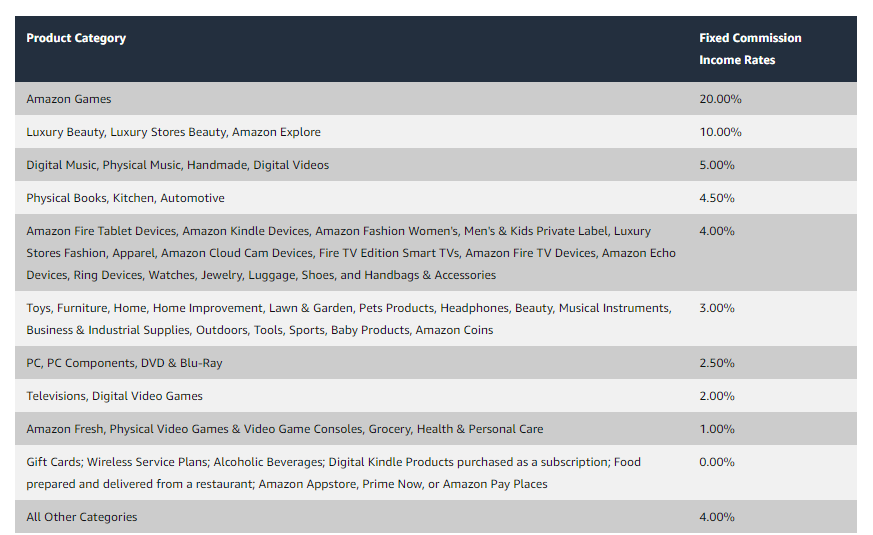
Further in this article, you will find top tips used by top Amazon affiliates to optimize their websites or blogs for higher organic traffic, click-through rates, and conversions.
Why You Need to Create an Amazon Affiliate Website
Various factors emphasize the need for Amazon affiliates to create an Amazon affiliate website. Here are a few that may interest you:
It Builds Credibility and Trust
When shopping online, the supplier or promoter’s credibility is one of the top factors that determines whether people will buy a product you recommend through your affiliate link.
When you properly create an Amazon affiliate website, publish helpful quality content, and position yourself as an expert, your visitors will build trust in you and find your website to be a credible source of information. This will make them return consistently to get product recommendations, purchase through your affiliate links, and also refer others.
When you promote Amazon products with good reviews from those who have used the product in the past or yourself, you can leverage the product’s credibility to increase the likelihood that your audience will click through and purchase time after time because you provided them with helpful information that influences their purchasing decision.
It Allows You to Diversify
With a well-built Amazon affiliate website, you can diversify in different ways from your income source to the products within your blog posts or on your pages.
This website does not limit you to only promoting Amazon products. You can promote products from other affiliate programs like eBay Network, AWIN, and ShareASale, allowing you to spread your affiliate income across different channels.

You can also share a single product available across multiple affiliate stores, so you can earn from whichever store your visitors choose. This can be achieved using the Product Image Button block in the Amazon AffiliateX plugin.
Another diversification benefit you can enjoy on an Amazon affiliate website is the ability to share different products within a single blog post or page in a well-structured display using Affiliate blocks.
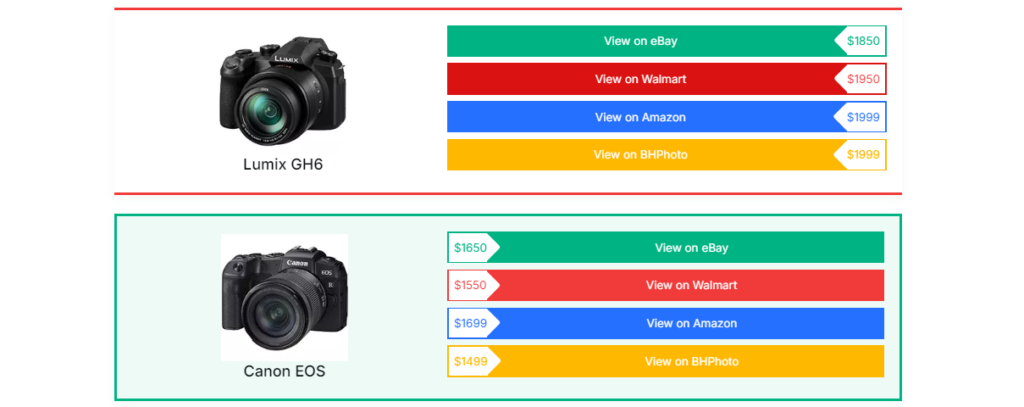
It Increases Your Affiliate Commission
Unlike social media posts that may not show up on your followers’ feeds after a while, when you create an Amazon affiliate website and publish posts about product reviews optimized for search engines, the post will generate traffic, increase click-through rates, and conversions.
This offers you a long-term source of income, especially if the product is always available in the affiliate store. Using customizable product display blocks and layouts allows you to showcase these products in a compelling way that’s proven to improve conversions.
How to Build a Amazon Affiliate Website in 9 Steps
1. Become an Amazon Associate
Before you create an Amazon affiliate website, the first and most crucial step is to become an Amazon affiliate by signing up on the Amazon Associate Program homepage. This process involves providing Amazon with information about yourself, your website(you can always add it later), your niche, and your intended audience.
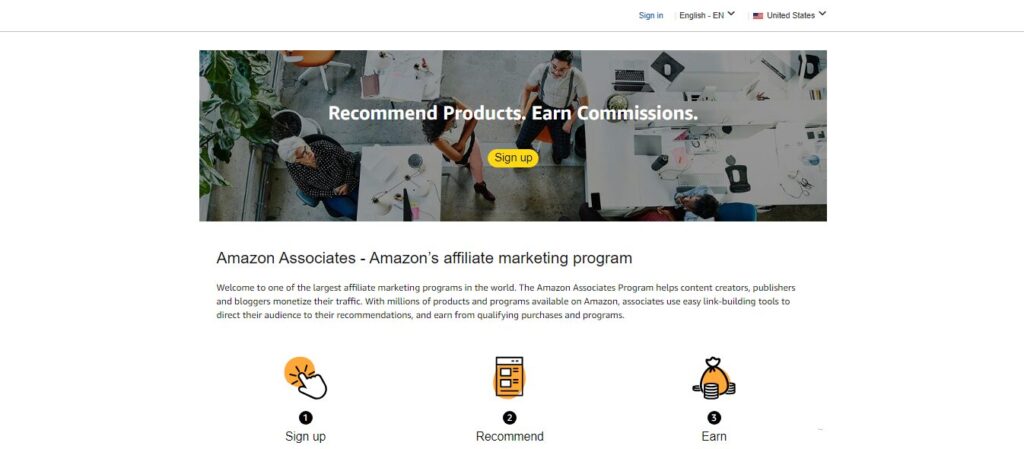
Here is a detailed step-by-step guide on how to become an Amazon affiliate.
Guidelines for Amazon Affiliate Marketing
Amazon’s affiliate program, just like any other program, has guidelines on the types of content and practices allowed. Hence, you must familiarize yourself with these to stay compliant. Here are a few guidelines to help you get started:
- You must be 18 years and above.
- You must have a website, blog, YouTube channel, social media account, or mobile app where you can promote Amazon products.
- Avoid promising discounts when the product you are promoting does not offer any discount. This is why it is advised to use notice blocks to display time-limited offers when a product is on discount.
- Avoid link cloaking, as Amazon frowns on it. This is because they require transparency with all affiliate links.
- Do not incentivize readers to click on links to get the reward. Amazon policies prohibit this.
- In summary, you must comply with Amazon’s Operating Agreement, which outlines detailed program rules and guidelines.
2. Decide Your Niche
Choosing a niche directly influences your success as an affiliate marketer. You must focus on a niche you are most familiar with and address your target audience’s concerns.
Once you decide on a niche, it will influence your search engine performance because a niche-focused website offers greater ranking opportunities due to its specificity in keywords.
This also gives you the advantage of positioning yourself as an expert compared to those whose websites are not niche-focused. It is also encouraged to perform keyword research after you have decided on a niche. This gives you an insight into what people are searching for in the niche.
You can use keyword research software like SEMrush or Ahrefs to get a sense of the kind of content you should create for your affiliate website. You can also consider searching for bestsellers on Amazon to help you decide which products to promote.

Examples of Amazon Affiliate Marketing Niches
Here is a list of some popular and profitable niches for Amazon affiliate marketing:
- Tech Gadgets and Accessories
- Health and Wellness
- Outdoor and Sports Gear
- Children and Family Products
- Pets and Pet Care
- Home and Garden
- Fashion and Beauty
- Kitchen and Cooking Equipment
- Arts and Crafts Supplies
3. Select a Domain Name
A domain name is a website address and identity. Because of its significance, it is essential to keep the domain name short, easy to spell, and memorable. Instead of using a long domain name like “Livestreamingandphotographygadgets” you can go for a shorter name that is clear and not confusing like “Mediagadgets”
After you have chosen a domain name, the next step is to decide on the top-level domain extension you want to use. There are various top-level domain extensions you can pick from, ranging from “.com” to “.store” and “.shop.”
Before you further purchase the domain name with its extension, it’s necessary to check if the URL is available. Sometimes, some URLs may have already been bought, which requires you to modify it or change the domain name. You can check the availability of the URL on name.com
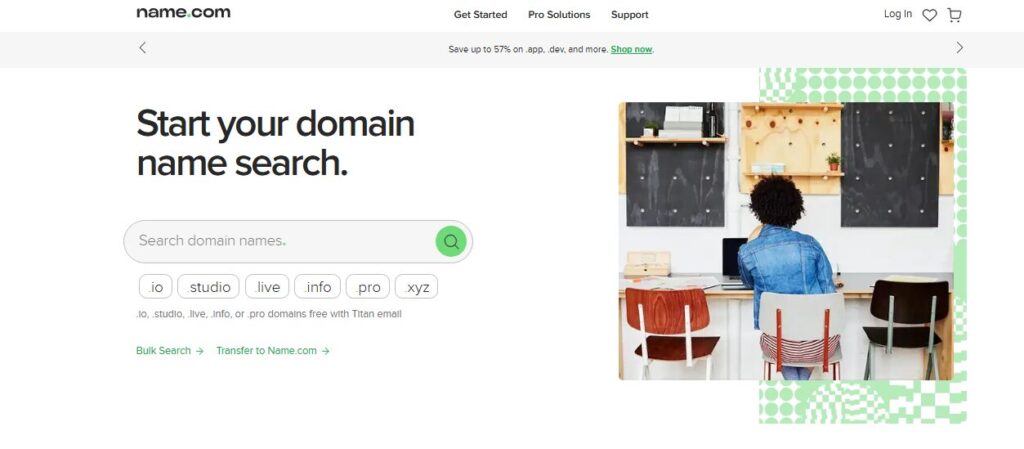
Here is an example of how a website URL looks with the domain name and extension:
“www.mediagadgets.com” or “www.mediagadgets.shop”
4. Choose a Web Hosting Service Provider
You have chosen a domain name and confirmed its availability. What’s next? To create an Amazon affiliate website, you need to choose a web hosting service provider to host your website. A web hosting provider can also register your domain name.
What is Web Hosting?
Think of web hosting as a space you rent on the internet to put your content or product so that it can be displayed and easily accessible to people, to see or purchase from you, just like a physical store.
Having given you an analogy, web hosting is a service that allows you to store your website files, content, and images on a server so that people can access them online. Every website needs a hosting service to be visible on the web.
When you choose a web hosting provider, you are simply renting space on their servers, designed to keep your website running smoothly and accessible 24/7.
Factors to Consider When Choosing a Web Hosting Provider
There are different web hosting services like Hostinger and Bluehost, among others. Before choosing anyone, consider the following factors:
- Choose a provider that is reliable with good reviews from other website owners.
- Consider your budget before choosing a hosting plan.
- Ensure the hosting plan you subscribe to has the features that suit your site’s needs.
- Go for a hosting provider with good customer service, especially if you are a beginner.

5. Install WordPress
Having sorted out your hosting service provider, you need to know that there are different Content Management Systems (CMS). Among all, WordPress is the most preferred CMS, especially for Amazon affiliate marketing for beginners and experts.
WordPress has a user-friendly interface, is highly customizable, and has a vast number of Amazon plugins that enhance product presentation, link management, and conversions.

Installing WordPress is typically straightforward. Most hosting providers like Hostinger and Bluehost offer a one-click installation option. If you don’t know how to navigate the hosting platform, you can contact their customer support for help.
6. Choose a Website Theme or Get a Web Designer
One of the advantages of WordPress is that it works perfectly with any kind of theme, niche-focused or multipurpose themes, from multiple types of themes (free or paid). Most of these themes are highly customizable, even if you do not know how to code.
When choosing a theme, ensure it is lightweight and optimized for search engines. These properties influence a website’s speed and ranking.
If you do not want to use any theme, you can decide to seek the services of web developers to build the website. If you need an expert WordPress developer to create an Amazon affiliate website, consider finding one on Codeable.

Amazon affiliate plugins like AffiliateX, with its Amazon API integration, work perfectly with any theme. It provides customizable layouts, including product comparison tables, single product locks, and call-to-action blocks, among other blocks, to enhance your content or product presentation and affiliate sales.
7. Install Lightweight Amazon Affiliate Plugins
WordPress has a suite of Amazon affiliate plugins that increase conversion rates by displaying content, enhancing user experience, easing purchasing decisions, increasing click-through rates, optimizing content for search engines, and offering opportunities to diversify affiliate income. Amazon affiliate plugins like AffiliateX provide such features.
The AffiliateX plugin also integrates with the Amazon API, simplifying the process of adding high-quality product images, product titles, descriptions, trackable affiliate links, and pricing, among other features, directly into your content to ensure product information is up to date with what is on Amazon.
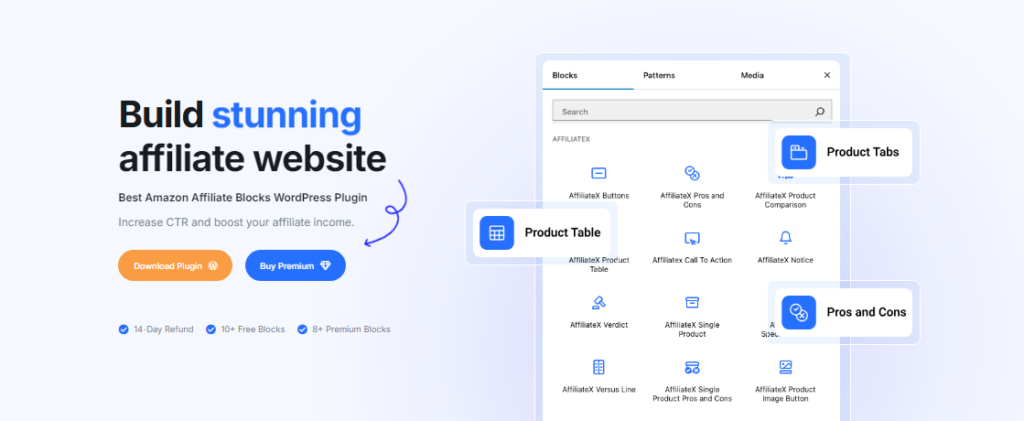
Other plugins offer link management features such as link tracking, link redirection, reporting and analysis, and automated link insertion into affiliate blocks or anchor text. Affiliate plugins like Pretty Links offer such functionalities.
8. Install Lightweight SEO and Speed Optimization Plugins
When you build an Amazon affiliate website, you need search engine optimization plugins to ensure your website architecture and content are structured and written to perform well on search engines.
SEO plugins like Yoast SEO and Rank Math, when installed and activated, help identify SEO issues on your website and content and suggest solutions to improve your website’s overall performance in search engines. They also provide you with an SEO score, especially for your pages and posts, to gauge them.
Speed optimization plugins like WP Rocket and LiteSpeed Cache, among others, help optimize your website’s speed to ensure it has a fast load time and reduced bounce rate. The speed of a website also influences its performance on search engines.
9. Start Creating Valuable Content on Your Website
After you create an Amazon affiliate website, you need to start creating helpful content to attract your target audience and drive affiliate sales, since your content is the backbone of your website.
Some of the best practices include creating product guides, comparison articles, and review posts tailored to your niche. Each of these contents should be valuable, relevant, and optimized for SEO. Use long-tail keywords, structured headings, and explicit language to make the content easy to read, navigate, and engaging.
When adding affiliate links to your content, ensure you add them naturally to avoid search engine bots flagging them as spam.
How to Optimize Your Amazon Affiliate Website to Increase Sales
It does not just end when you create an Amazon affiliate website and publish a couple of pieces of content. Affiliate marketing is a continuous effort, as you need to learn the best practices top affiliates use to increase your affiliate income.
Here are a few strategies to help you:
Do Keyword Research and Create Valuable Content
Don’t just think about what to write; start writing. Do your keyword research to understand what your target audience is searching for and their search intent. This enables you to create content that addresses their pain points, proffer solutions, and drive more organic traffic.
As mentioned earlier in this guide, use tools like Ahrefs, SEMrush, or Google Keyword Planner to find keywords that match your niche. One of the best practices is to use long-tail keywords with lower competition but high search volume.
Optimize Your Content for SEO
Did you know you can create helpful content that should rank higher but rank lower? This usually happens when you don’t optimize it for search engines.
Always ensure each post is optimized for target keywords, structured with proper heading tags, and includes good metadata (meta title, description, alt text, etc). Use appropriate linking and avoid keyword stuffing, which can lead to penalties.
Use plugins like Yoast SEO to help ensure each content and page is optimized for search engines. Here are more helpful tips to increase your affiliate income through SEO.
Optimize Your Website for Speed
A slow website will get you higher bounce rates. Using speed optimization plugins, as mentioned earlier in this guide, helps your website load faster because your website’s speed also influences your SEO performance.
When your website loads faster, it enhances user experience and makes visitors want to click on your website when it shows up in other searches, hence increasing the likelihood of conversion.
Share Balanced Product Reviews and Verdicts
This is important, especially if you want to build credibility and trust with your visitors. Share balanced reviews like the advantages and disadvantages of the products.
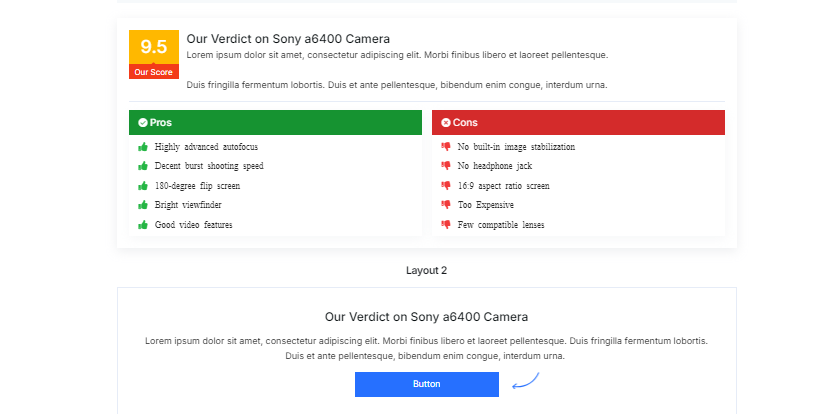
If you have used the product before or know someone who has, offer honest verdicts on the product. When you share transparent reviews, it resonates better with your readers, leading to higher conversions.
Avoid Cloaking Amazon Affiliate Links
Amazon requires transparency with affiliate links. It is totally against their policy. So avoid cloaking Amazon affiliate links. This ensures Amazon does not ban you from their affiliate program.
The Amazon API integration helps ensure you comply with Amazon’s link guidance by automatically generating trackable individual product affiliate links to avoid link cloaking and assuring adherence to Amazon’s strict guidelines.
You can cloak affiliate links from other affiliate programs if it is not against their policy.
Showcase Products in an Engaging and Interactive Way
The way you present products influences your click-through and conversion rates. You can display your affiliate products within your content interactively using affiliate blocks. This helps your readers better understand the product, increasing the likelihood of a purchase.

Announce Special Offers
Promoting special deals or limited-time offers can drive more conversions. You can display coupon offers or discounts on various products within your content to encourage your readers to click through and make purchases.
Conclusion
Successfully building an Amazon affiliate website requires dedication, hard work, and a solid understanding of SEO and strategic marketing, which any beginner committed to the task can achieve.
These nine steps, along with the other tips shared in this guide, can help build and optimize your website for performance, boosting your click-through rates and conversions.
Affiliate tools like AffiliateX can help you showcase content, offers, and products more engagingly and interactively, thereby engaging readers, building trust, and boosting affiliate earnings.
Frequently Asked Questions
1. How do I set up an Amazon affiliate?
To set up an Amazon affiliate, sign up for the Amazon Associates program. During registration, you’ll need to provide details about your website or app (if you don’t have one, you can add it later), such as its niche, traffic sources, and content focus. After it is approved, you can start creating affiliate links directly from Amazon’s site or using their SiteStripe toolbar.
2. How do I make my affiliate website?
To make your affiliate website, start by signing up for the Amazon Associate program, then select a niche you’re passionate about or one with high demand. Choose a domain name that’s easy to remember and relevant to your niche, then sign up for a reliable web hosting provider like Bluehost or Hostinger. Next, install WordPress as your content management system and choose a lightweight and responsive theme. Use plugins like AffiliateX blocks to display products interactively, then begin creating valuable content, such as product reviews and buying guides, and optimize them for SEO to attract organic traffic.
3. How much does it cost to create an affiliate website?
Building an affiliate website can cost anywhere from $50 to over $1,000, depending on your preferences.
Your key expenses can include:
- Domain name
- Web hosting plan
- Free or premium WordPress theme
- Free or paid SEO and affiliate plugins
It is advised to do your research first and start with minimal costs and scale up with premium tools as your website grows and generates income.
4. What is the best platform to create an Amazon affiliate website?
WordPress is widely considered the best platform for building an Amazon affiliate website due to its flexibility, extensive plugin library, and ease of use. WordPress gives you complete control over your website’s design, functionality, and SEO, plus access to a vast number of themes and plugins suitable for affiliate marketing, like AffiliateX for product display and Rank Math for SEO.
Start boosting your Affiliate income today!
Increase CTR and boost your income with our lightning-fast AffiliateX blocks?
