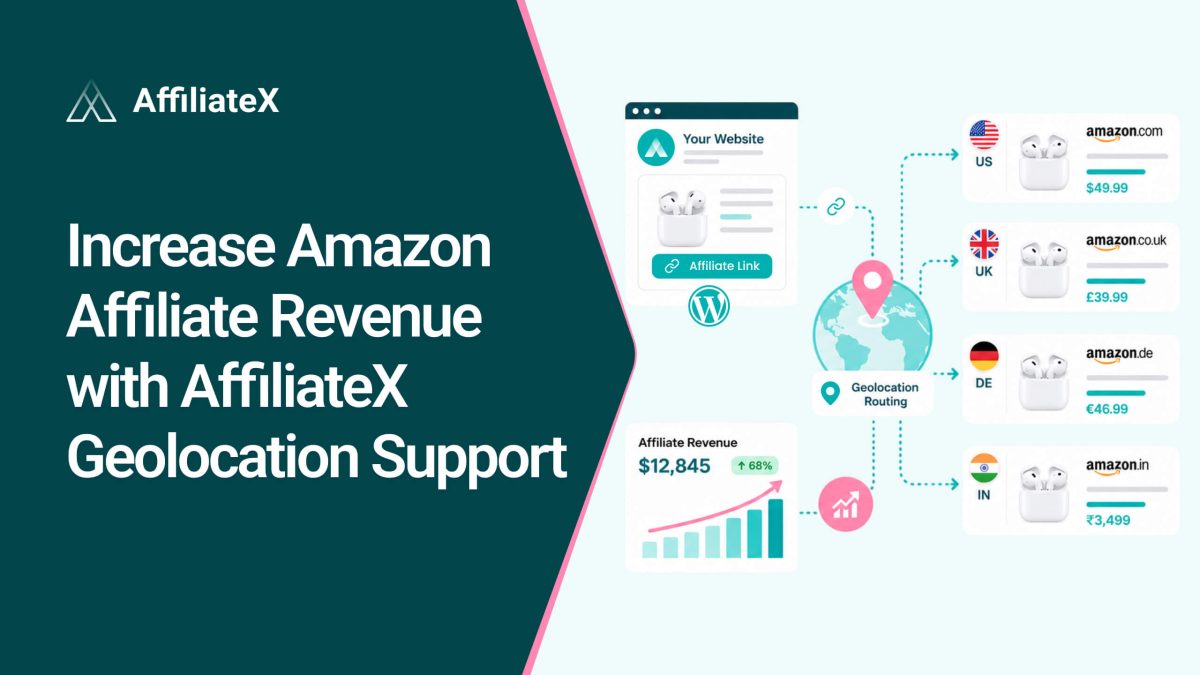
Suppose a reader in Canada finds your review, loves the product, and clicks your Amazon link. But your link points to the US store. Now they are on a page where the price is in the wrong currency, shipping may not apply, and the item might not even be available to them. Most people in that situation just give up, and that sale, the one you earned, vanishes.
This happens more than most affiliates realize. Every Amazon marketplace is separate, so a single link can’t serve a worldwide audience well. AffiliateX Geolocation fixes the problem by automatically sending each visitor to their local Amazon store. Here’s how it works and how it can lift your revenue.
Amazon runs separate stores for different countries, such as Amazon.com, Amazon.co.uk, Amazon.ca, and many more. Each one has its own listings, prices, and affiliate program. A link to one store generally won’t earn you a commission from a buyer in another country, and it often won’t even let them complete a purchase.
So if your content reaches a global audience, and most content does, a plain single-country link quietly costs you money. International readers click, hit the wrong store, and leave. You did the hard part, earning the click, but the sale slips away at the very last step.
How Geolocation Turns Lost Clicks Into Sales
AffiliateX Geolocation detects each visitor’s location and automatically routes them to the corresponding local Amazon storefront. Instead of forcing everyone to the same store, it sends each reader to the one where they can actually buy in their currency and with their availability.
For you, that means the clicks you were already getting from other countries finally have a chance to convert. Same content, same traffic, more completed sales. It’s one of the simplest ways to grow your Amazon revenue without creating anything new.
Two Settings That Do Geolocation Work
When you enable Geolocation, AffiliateX offers two simple configuration options. Together, they handle the routing and the tracking.
Amazon Store: This is a drop-down where you choose your preferred local store country. AffiliateX uses this to make sure international visitors are routed to the correct localized storefront and redirected accordingly, so they land where they can shop.
Tracking ID: Enter your unique Amazon affiliate Tracking ID here. This lets AffiliateX automatically retrieve and sync performance data directly from your Amazon affiliate account, so your regional sales are properly tracked and credited to you.
Set these two, and the feature takes care of the rest in the background.
Configure AffiliateX Geolocation Setting in a Few Clicks
Turning on Geolocation takes only a moment. Here’s the whole process.
First, make sure both AffiliateX Free and AffiliateX Pro are installed and active on your WordPress site. Then go to AffiliateX > API Integration > Amazon Settings and scroll down until you reach the Geolocation section.
Enable the toggle to activate the feature. Two options will appear. One is the Amazon Store and Tracking ID. Choose your preferred store country from the drop-down, enter your Amazon affiliate tracking ID, and you are all set. From that point on, your visitors are automatically routed to their local store.
Who Gains the Most From AffiliateX Geolocation Support
Geolocation helps almost any Amazon affiliate, but a few will see an especially big difference.
Sites with global readers: If your analytics show visitors from many countries, you are likely losing sales on every international click. Geolocation recovers them.
Broad, popular niches: Topics like tech, home goods, fitness, and travel attract worldwide audiences, exactly the kind of traffic that benefits from local routing.
Content that ranks internationally: If your posts show up in search results around the world, geolocation ensures that global visibility actually translates into commissions.
If any of these sound like your site, this feature is one of the quickest revenue wins available to you.
How to Maximize Regional Revenue
A few smart habits help you squeeze the most from Geolocation.
Check where your traffic comes from: Use your analytics to see which countries send you visitors, so you understand just how much international traffic you are working with.
Set your store thoughtfully: Pick your preferred store based on where a large share of your audience actually is, not just your home country.
Confirm your Tracking ID is correct: Accurate tracking ensures your regional sales are properly credited, so double-check the ID you enter.
Write for a global audience: Avoid region-only references where you can, so your content stays useful to readers everywhere and earns clicks from more markets.
Review your results over time: Watch your regional performance after enabling the feature to see the difference it makes, and keep refining.
Explore AffiliateX Geolocation Support!
The clicks you lose to the wrong Amazon store are some of the most frustrating, because you already did the work to earn them. AffiliateX Geolocation stops that loss. It automatically sends every visitor to their local Amazon storefront so that international readers can buy, and you get credited for the sale.
Setup takes just a few clicks, like enabling the toggle, choosing your store, and adding your Tracking ID. After that, the feature works quietly in the background, helping you turn global traffic into global revenue. If your content reaches readers beyond your home country, enabling Geolocation is one of the easiest ways to earn more from your existing audience.
Quick, clear explanations to help you use AffiliateX with confidence.
01
What does AffiliateX Geolocation do?
t detects a visitor’s location and automatically routes them to their local Amazon storefront, so international readers can buy where they actually shop, and you earn the commission.
02
Do I need AffiliateX Pro to use Geolocation?
Yes. You will need both AffiliateX Free and AffiliateX Pro installed and active on your WordPress site.
03
What is the Tracking ID for?
Entering your unique Amazon affiliate Tracking ID lets AffiliateX retrieve and sync your performance data from your Amazon account, so your regional sales are tracked and credited correctly.
04
Will it really increase my revenue?
By routing international visitors to a store where they can complete a purchase, Geolocation helps you convert clicks that would otherwise be lost, turning existing traffic into more sales.
Afrin is a skilled Product Marketing Specialist passionate about WordPress products. She effectively combines her background in Telecommunication Engineering and her MBA in Marketing to bridge technology and marketing. Afrin transforms technical WordPress features into compelling, user-centric content that drives conversions and fosters engagement. In her free time, she enjoys traveling, animated movies, and singing, reflecting her creativity and adventurous spirit.