Imagine a reader lands on your affiliate post, likes a product, and clicks through only to find the price has changed and the item is out of stock. In that moment, you lose the sale and a little trust. And if it keeps happening, you risk falling out of line with Amazon’s rules too.
The cause is almost always the same, like outdated product data. When you add prices and details by hand, they go stale fast. Amazon changes prices often, swaps images, and updates listings, and you can’t keep up with all of it manually.
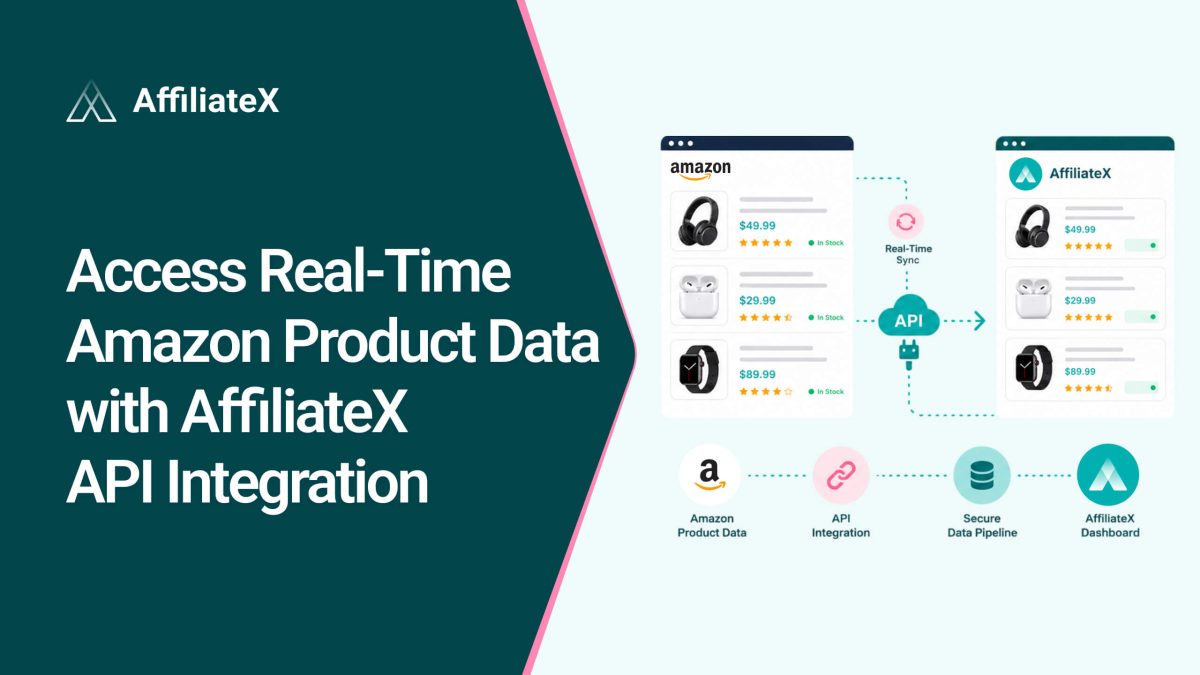
AffiliateX includes an Amazon API integration. It connects your site to Amazon’s live database and automatically pulls in real-time product data. Your prices, images, and links stay accurate on their own, so your content stays trustworthy and compliant. This guide explains how AffiliateX API Integration works and how to use it to save time and earn more.
Quick Recap: The AffiliateX API integration connects your WordPress site to the Amazon Creators API by following a few steps. Once linked with your preferred AffiliateX blocks to design your affiliate site, it will then automatically pull live product data, titles, images, descriptions, prices, and your tracking links, straight from Amazon and display them in your blocks. When Amazon updates a detail, your site updates too, with no manual editing. So you set it up once, and your product information stays up to date automatically. Let’s look at why that matters and how each part works.
Why Real-Time Amazon Product Data Matters
Accurate, up-to-date product data isn’t a nice-to-have. It directly affects your trust, your sales, and your standing with Amazon. Here’s why it’s so important.
Builds reader trust: When the Amazon product price and details on your page match what readers see on Amazon, they feel confident clicking and buying. A mismatch does the opposite.
Protects your commissions: Incorrect prices and broken links drive readers away before they buy. Real-time data keeps every link working and every price correct, so you capture more sales.
Keeps you compliant: Amazon’s rules require you to show current pricing and to use approved product images. So your product lives data from the API, keeps your content within those rules and lowers the risk of account problems.
Saves you hours: Manual updates eat your time and invite mistakes. Automatic syncing frees you to focus on writing and growing your site.
What Amazon Product Data Can You Pull In
Once the API is connected, AffiliateX gives you access to the key product details your content needs. You can pull in:
Product titles
High-resolution images
Product descriptions
Current prices
Your unique affiliate tracking links
These load directly into your AffiliateX blocks, so your product boxes, tables, and comparisons are filled with real, live information. You can also remove or change any details if you want, though using Amazon’s own images and data is the safest and most compliant choice.
How the Amazon API Connection Works
The integration runs on the Amazon Creators API, Amazon’s official way to access product data. Setting it up is simple, and you only do it once.
You enter your Amazon Creators API credentials in AffiliateX. When the connection succeeds, you will see a “verified” message. To confirm it’s working, open your post editor, add an AffiliateX product block, and try editing a product detail. If you see the Amazon icon among the editing options, you are connected and ready to pull live data.
Amazon Creators API integration is a premium AffiliateX feature available to paid users. If you don’t have API access yet, AffiliateX has a solution for that, too, which you will learn about below.
How to Get Started
Setting up real-time data is quick. Follow these simple steps.
Install AffiliateX: Add the plugin to your WordPress site and activate it.
Choose your access method: Enter your Amazon Creators API credentials, or start with Zero API if you don’t have access yet.
Confirm the connection: Look for the “verified” message, then check the Amazon icon in a product block to confirm it’s working.
Add a product: Use Product Search or enter an ASIN with Dynamic Listing. The live data is automatically loaded into your block.
Publish and relax: Your prices, images, and links are now automatically kept up to date. Once you have done this, every product you add stays accurate without any manual upkeep.
Key Features of AffiliateX API Integration
This powerful AffiliateX API integration with Amazon is more than a simple data pull. It comes with several smart features that handle the hard parts for you. Here’s what each one does.
Product Search with Auto Updates
The Product Search feature eliminates manual updates, and AffiliateX automatically syncs high-resolution images, titles, descriptions, and real-time prices from Amazon’s live database. You just choose the blocks from AffiliateX 20+ exclusive blocks, search for a product, add them, and the blocks automatically keep their details up to date. Your content stays accurate and compliant, and you save hours of tedious editing.
Dynamic Listing with ASIN
The AffiliateX Dynamic Listing feature makes adding products to your Amazon affiliate website even faster. You simply enter a product’s ASIN, the unique ID Amazon gives every item, and the block pulls live titles, images, and pricing from the Creators API. There’s no manual entry. Your listings stay accurate, compliant, and ready to convert.
Zero API for Easy Access
Not everyone can use the Creators API right away. Amazon requires API keys and, in many cases, three qualifying sales before granting access. That can block new affiliates from the start.
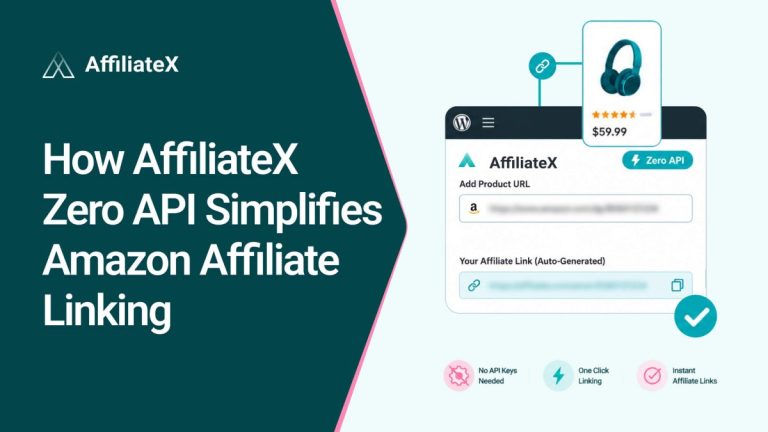
Zero API clears that hurdle. It lets you pull live product titles, images, and pricing directly from Amazon without needing API keys or meeting the 3-sale requirement. So if you are brand new or dealing with Creators API limits, you can still build and maintain a professional, high-converting Amazon affiliate site. It’s a temporary way around Amazon’s strict access rules, so you never have to wait to get started. And once you have the API key, you can easily connect to Amazon Creators API and start pulling live data of your affiliate products right away.
Geolocation Support
Your visitors come from many countries, and a single Amazon link can leave money on the table. Geolocation support fixes this. It detects each visitor’s location from their IP address and automatically redirects them to their local Amazon storefront.
Readers get a relevant, local shopping experience that boosts conversions, and you earn from international traffic instead of losing it. The feature is also customizable, allowing you to configure it to meet your GDPR and privacy requirements.
Automated Link Compliance
Affiliate links must comply with Amazon’s strict guidelines, and a manual error can flag your account. AffiliateX handles this for you. It automatically generates trackable, compliant affiliate links with no risk of manual errors. The integration handles the technical details, so every link stays within Amazon’s rules while you save time.
How Real-Time Amazon Data Helps You Earn More
Put these AffiliateX features together, and the payoff is clear. Your site becomes more accurate, more trustworthy, and easier to run.
Because prices and stock levels stay up to date, readers trust your recommendations and click with confidence. As links are always compliant and working, you don’t lose sales to dead ends or account flags. And geolocation routes global visitors to the right store, you earn from a wider audience. Also, everything updates automatically, so you spend your time creating content rather than fixing outdated data.
Each of these improvements supports the same goal, like more clicks, more conversions, and more commissions, with less effort from you.
The free version gives you essential affiliate blocks to start displaying products. The Amazon Creators API integration, the part that auto-syncs live data, is a premium feature. Premium plans start at $79 per year for one site, with lifetime options available too.
If you are serious about Amazon affiliate marketing, the premium API integration usually pays for itself. The time you save and the commissions you protect with accurate, always-current data tend to outweigh the cost. And if you are not ready for the Creators API yet, Zero API lets you pull live data and grow until you are.
Tips for Getting the Most From Live Data
A few simple habits will help you make the most of the integration.
Use Amazon’s own images and data: They are compliant and accurate, and they keep your account safe. Avoid swapping in random images from elsewhere.
Turn on geolocation early: If you get any international traffic, this is one of the easiest ways to grow your earnings.
Add your ASINs as you research: Dynamic Listing makes it fast, so build the habit of dropping in an ASIN whenever you find a product worth featuring.
Check your links now and then: Automatic compliance does the heavy lifting, but a quick periodic review keeps everything tidy.
Pair live data with honest writing: Accurate prices build trust, and genuine, helpful reviews turn that trust into clicks.
Get Amazon Product Data with AffiliateX API Integration
Outdated product data quietly costs affiliates trust, sales, and peace of mind. AffiliateX API integration removes that problem. It connects your site to Amazon’s live database and automatically keeps your titles, images, descriptions, prices, and links up to date.
With features like Product Search auto-updates, Dynamic Listing by ASIN, Zero API for easy access, geolocation for global earnings, and automated link compliance, you get a site that’s accurate, trustworthy, and simple to run. You set it up once, and your content stays up to date while you focus on growth.
So connect AffiliateX, pull in real-time Amazon product data, and give your readers the accurate, up-to-date information they expect. Accurate data builds trust, and trust turns into clicks, conversions, and commissions.
Quick, clear explanations to help you use AffiliateX with confidence.
01
What product details can I pull with the Amazon API in AffiliateX?
You can retrieve product images, titles, descriptions, and prices, along with your affiliate tracking link. These load directly into your AffiliateX blocks and stay updated automatically.
02
Can I use the Amazon Creators API on the free version of AffiliateX?
No. The Amazon Creators API integration is a premium feature available to paid AffiliateX users. If you are on the free version, you can use Zero API to pull live data instead.
03
Can I change or remove product details added through the API?
Yes. You can edit or remove any product detail that the API adds. That said, Amazon advises using its own approved images and data, so sticking with the API’s content is the safest, most compliant choice.
04
How do I know if my Amazon API is working in AffiliateX?
After you enter your credentials and see the “verified” message, open your post editor and add an AffiliateX product block. Try editing a product detail. If the Amazon icon appears among the options, your API is connected and working.
Afrin is a skilled Product Marketing Specialist passionate about WordPress products. She effectively combines her background in Telecommunication Engineering and her MBA in Marketing to bridge technology and marketing. Afrin transforms technical WordPress features into compelling, user-centric content that drives conversions and fosters engagement. In her free time, she enjoys traveling, animated movies, and singing, reflecting her creativity and adventurous spirit.