

How to Choose The Best Amazon Affiliate Plugin for WordPress

Choosing the best Amazon affiliate plugin for WordPress is the most critical decision for any affiliate marketer looking to maximize earnings. The best Amazon affiliate solution WordPress will address the core challenges of affiliate marketing, such as increasing your Click-Through Rate (CTR), maintaining Amazon Compliance, and ensuring fast Speed and Performance for high SEO rankings.
The best solution must offer conversion-focused elements like comparison tables and product boxes, seamless Amazon API Integration for real-time data accuracy, and a lightweight, block-based structure for ease of use and site speed. It must act as an automation and design powerhouse, letting you focus on content creation rather than manual updates and complex coding.
So now, without any further ado, let’s get started to give a complete overview of how to choose the best Amazon affiliate plugin for your WordPress site, considering the key facts.
How to Define the Best Amazon Affiliate Plugin
The best Amazon affiliate plugin isn’t just about having lots of features. It’s about solving your main challenges. Here are four things to look for:
Conversion-First Design
Click-through rate is key in affiliate marketing. Choose a plugin with eye-catching, flexible blocks like product boxes, comparison tables, and review summaries to get more clicks. If it only offers plain text links, look for a better option.
Speed and Performance
Google rewards fast websites with better rankings. Some older Amazon affiliate plugins use complex code or outdated rendering methods to build and display your website’s pages, which can slow your site’s load time.
The best plugin should be lightweight, meaning it adds little to your site’s load time, and be built using modern frameworks (software tools for creating web applications), such as React. This ensures your site remains quick and responsive.
Compliance and Automation
Amazon’s Associates Program Operating Agreement is strict. Manually updating every product’s price isn’t realistic. The best plugins connect to the Amazon Product Advertising API to fetch real-time prices, availability, and details, helping you avoid errors or rule violations caused by outdated information.
Ease of Use
You shouldn’t have to code to make a comparison table. The best Amazon affiliate plugin works smoothly with the WordPress editor or your page builder, so you can customize everything visually and build your site easily, no shortcodes needed.
Evaluate Before Choosing the Best Amazon Affiliate Plugin
Use this four-point checklist before picking any tool to help you earn more as a WordPress Amazon affiliate marketer.
Data Automation
Amazon’s strict terms require accurate product info, especially pricing. Manual updates can result in violations. Choose plugins that automate data updates to stay compliant.
API Integration
Your chosen solution must connect directly to the Amazon Product Advertising API. An API (Application Programming Interface) is a way for different software to talk to each other. Connecting ensures your site receives up-to-date product information, including prices and stock levels. If a price changes on Amazon, your website updates it instantly.
Handling API Limits
Good plugins use caching, which means they temporarily store recent data to reduce API requests. Since the API has limits on how often you can request data, caching helps you avoid hitting those limits and keeps your API key safe.
Zero API Mode for Beginners
Zero API Mode is for beginners who don’t yet have full access to the Amazon API. It lets you add product details by hand and create visually appealing display blocks, so you can get started quickly before you qualify for automatic updates.
Display Flexibility
The best Amazon affiliate plugin offers many attractive ways to display products, helping increase your Click-Through Rate (CTR, the percentage of readers who click your links). Look for plugins with pre-designed blocks for different parts of your review posts, not just basic product boxes.
- Comparison Tables: These let you show products side by side and should work on any device. You should make them easily with a visual editor, without needing to code. Side-by-side comparisons help readers choose what to buy.
- Specialized Review Blocks: Conversion-optimized plugins include unique blocks to build trust and authority.
- Verdict Box: A high-impact summary block for your final rating and recommendation. Displays technical details cleanly for product-focused reviews.
- Choose a plugin that lets you customize how your site looks, so it matches your brand and looks great.
Cost and Future-Proofing
Pricing
The plugin’s features should be worth the price. Think about whether you want a one-time payment or a subscription, and make sure updates and support are included.
Compatibility Check
The best Amazon affiliate plugin should work with the WordPress Gutenberg editor and the latest PHP versions. This keeps your website fast and reliable and helps you avoid using outdated systems like shortcodes.
📚 Learn More: [Complete Guide] How to Create an Amazon Affiliate Website
AffiliateX: Best Amazon Affiliate Plugin for WordPress

AffiliateX is a block-based WordPress plugin made for affiliate marketers, especially those working with Amazon. It offers customizable, high-converting blocks to help you create professional, fast-loading content that boosts clicks and income, no coding needed.
Why Choose AffiliateX Solution Without a Second Thought
AffiliateX stands out for its speed, blocks designed to increase conversions, ease of use, and many customization options. Here are the main benefits:
Conversion-Focused: Ready-to-Use Blocks
- Offers essential, high-converting blocks, including Single Product, Product Comparison Table, Pros and Cons, Call to Action (CTA), Verdict/Rating, Specifications, and Notice.
- Each block is made to catch your visitors’ attention and help them decide to buy.
Exceptional Customization & Design
- You get controls for alignment, colors, fonts, and layouts so that you can match every block to your brand.
- There are several layouts for key blocks, such as Single Product and Pros and Cons, giving your content a more interactive and professional look.
- With AffiliateX, you can see live previews as you edit. You don’t need to know any programming, so making design changes is easy for everyone. And it’s fully compatible with Gutenberg, Elementor, and modern tech like React.
- The blocks are built for speed and are lightweight, so your site won’t slow down as it might with heavier plugins.
Seamless Amazon API Integration (Pro Feature)
- Connects directly to the Amazon Product Advertising API (in Pro version).
- It automatically imports product details, saving you time and helping you avoid manual mistakes.
- It keeps your content compliant by updating product information and prices in real time, in accordance with Amazon’s rules.
Beginner-Friendly with “Zero API” Mode
- Zero API Mode lets beginners show Amazon products by entering details manually, so they can get started quickly before they have API access.
- Setup is quick and easy, so you can start building product showcases right after installing.
Flexibility and Compatibility
- This plugin works with any up-to-date WordPress theme.
- You can also use it for products from other affiliate programs, like eBay or ShareASale.
Responsive Design
All blocks are fully responsive, so your content looks good on any device. This is important for SEO and user experience.
Bonus: How to Get Started with AffiliateX
Now that you know why AffiliateX is a great choice, here’s how to connect your Amazon affiliate store and set up your API key.
Step 1: Install, Activate & Configure AffiliateX
To start building high-converting product links in WordPress with AffiliateX, first install and activate the plugin on your site.
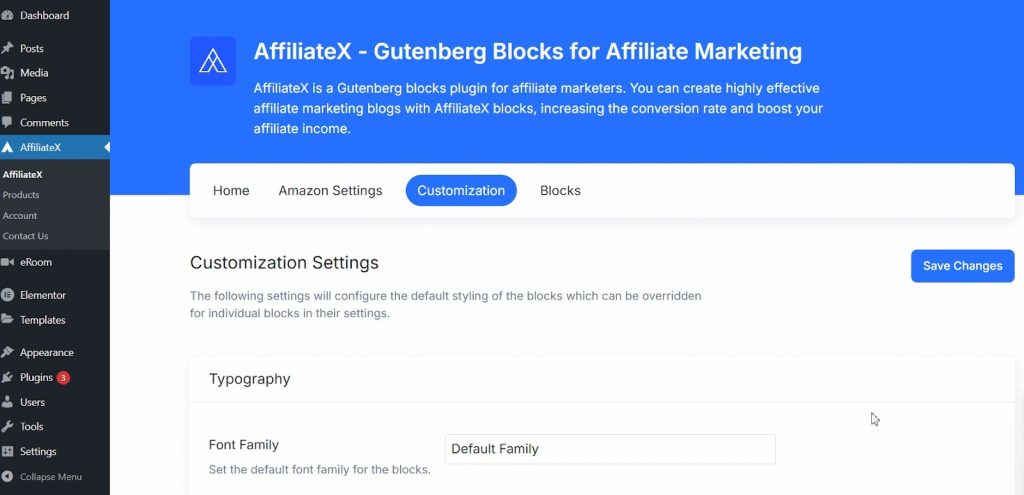
After installing, go to AffiliateX and start with Customization settings. AffiliateX works with Gutenberg, Elementor, and any WordPress theme.
Step 2: Connect With Your Amazon Associates Account
Connect your WordPress site to your Amazon Associates account to start earning commissions.
If you haven’t signed up yet, join Amazon Associates for free. After you’re approved, go to your dashboard to get your affiliate links and API keys.
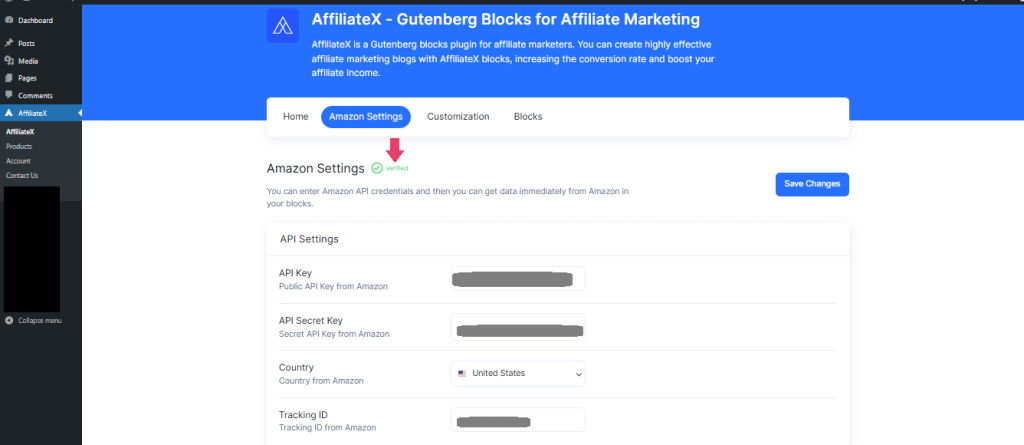
API keys let AffiliateX pull real-time product information, keeping your store up to date and in compliance with Amazon’s guidelines. In WordPress, open AffiliateX Settings, enter your API details, and click ‘Save Changes’. Your site is now connected to Amazon, so you can add products easily without manually updating them.
Zero API lets you add Amazon product links and content easily, even if you haven’t set up the API yet.
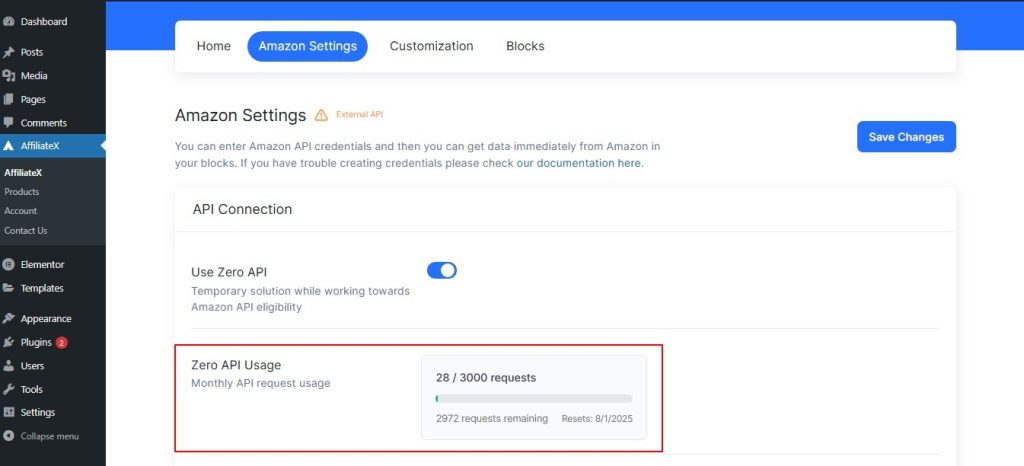
This feature is for people who don’t yet have access to Amazon’s Product Advertising API, such as new affiliates or those who want to avoid API limits and errors. Just enable the option and do a quick setup to get started.
Step 3: Add High-Converting Product Links in WordPress Using AffiliateX
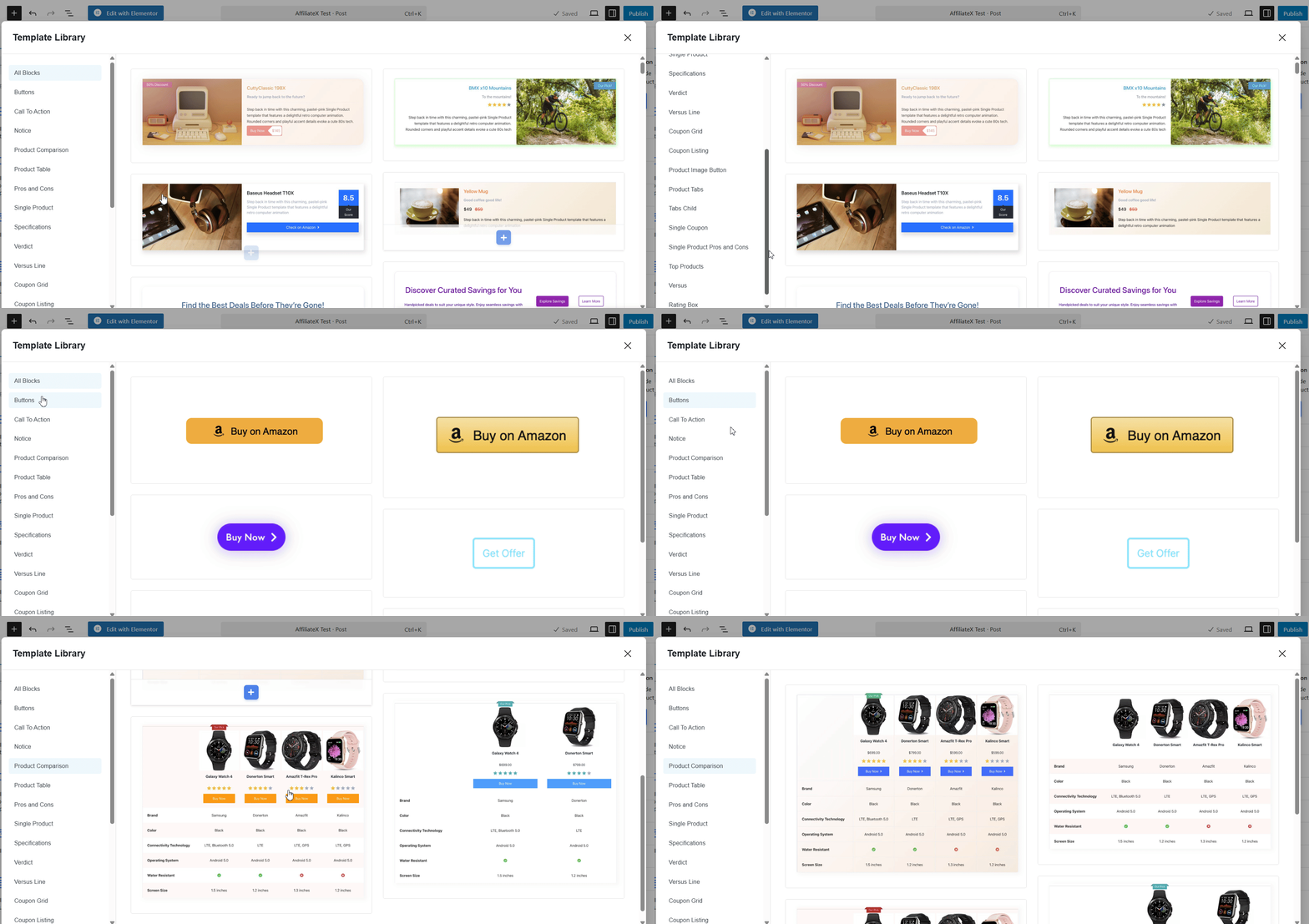
If your affiliate website uses the Gutenberg editor, you can use AffiliateX blocks to create an interactive Amazon affiliate sales landing page without any coding. You can also add Comparison Tables, Single Product Blocks, Versus blocks, and more to your affiliate blogs to boost your commissions during sales or at any time.
The best part is that you can use ready-made templates for each block. Just pick your favourite layout and start designing your Amazon affiliate site for holiday sales; no need to start from scratch.
👉 Learn More: AffiliateX + Elementor: The Affiliate Marketing Combo You’ve Been Waiting For
You can also automatically add product data by connecting to the product API and easily set up product updates, which helps you follow Amazon Affiliate program rules. Check out the detailed documentation to learn how to use the Amazon API in the Gutenberg Editor with AffiliateX.
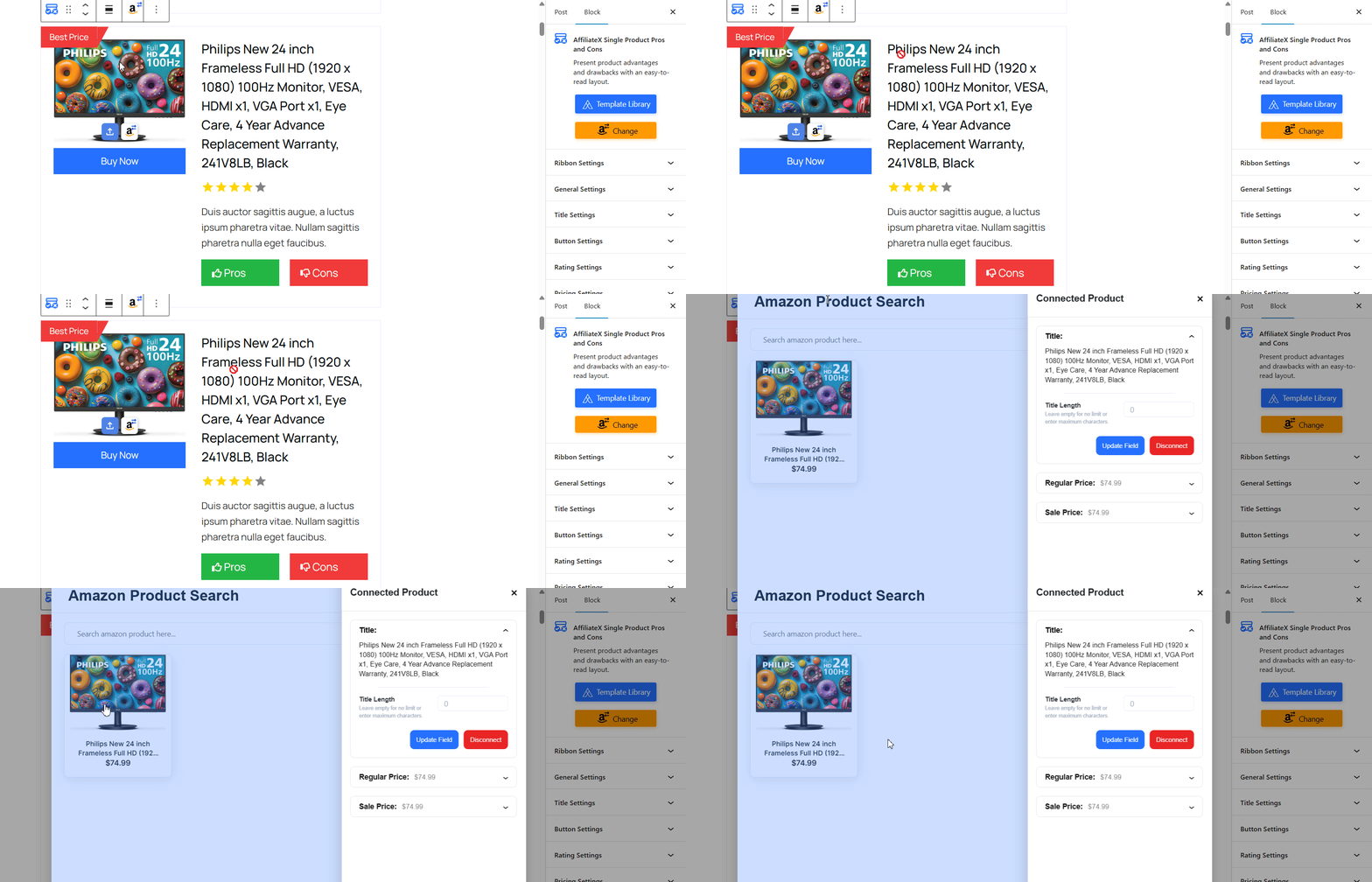
For example, with AffiliateX Single Product blocks, just connect your Amazon Affiliate link, search for the product you want, click it, and add it to your site.
It will then pull in the data automatically and show you a list of updates. You can check and update product image, title, price, description, and button links, all of which are fully compliant with the Amazon Associate Program policy.
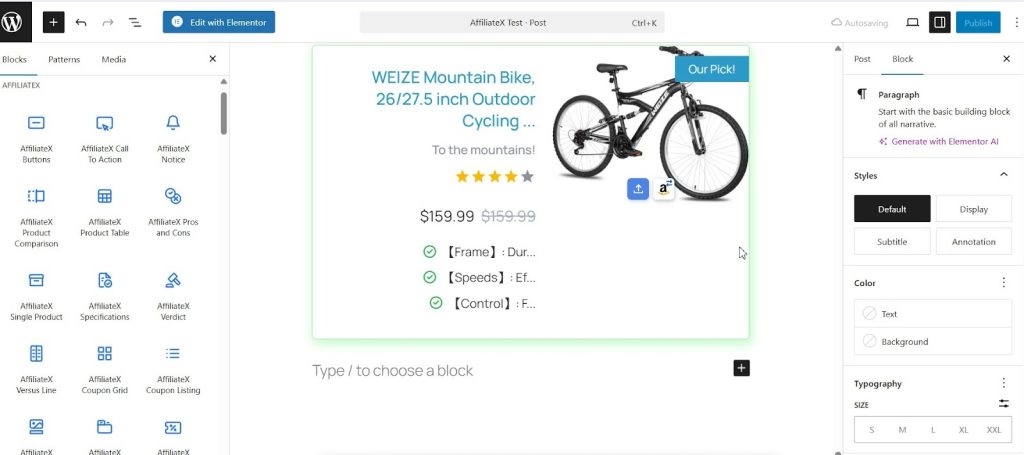
Final Step: Scale Your Amazon Affiliate Marketing User Experience
Set up the AffiliateX Call to Action block to make your holiday sales or promotional offers stand out and help boost your affiliate sales.
After that, you can choose the AffiliateX Coupon Listing, Coupon Grid, or Single Coupon blocks to show your Amazon affiliate sales deals, whichever you prefer.
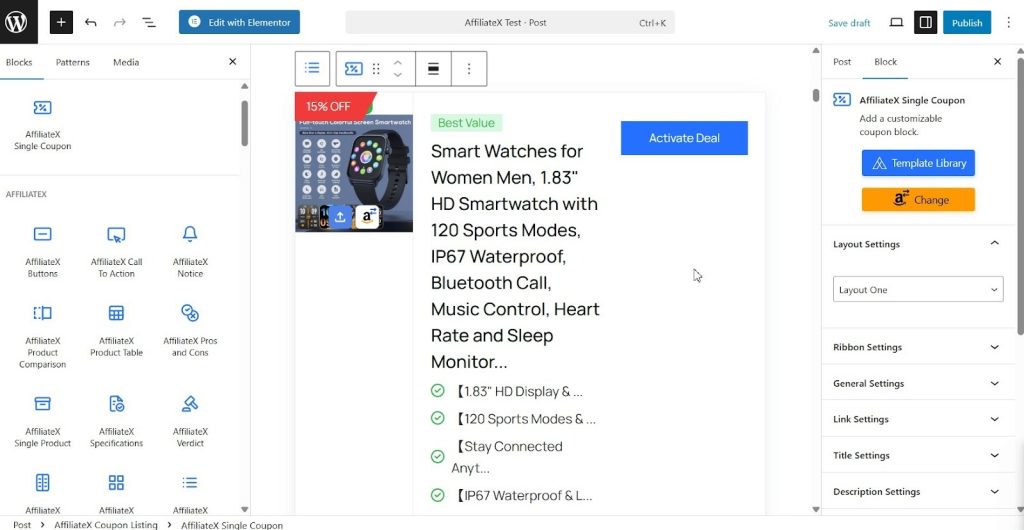
Other than that, you can enjoy another bunch of amazing Amazon Affiliate blocks that help you manage your affiliate sales deals or any sort of regular promotion activities to engage your potential customers and active customers to escalate your affiliate commissions and earn maximum revenue in one instance.
Comparison: Why AffiliateX is the Best Amazon Affiliate Plugin for WordPress
Here is a comparison table outlining the key aspects of affiliate marketing content creation and how AffiliateX delivers a superior solution, especially for Amazon affiliates.
| Aspect | What to Look for (Affiliate Marketer Needs) | How AffiliateX Delivers |
|---|---|---|
| Content Creation | Pre-built, high-converting display formats (boxes, tables, lists) to save time. | Provides a complete suite of Gutenberg/Elementor blocks (Single Product, Comparison Table, Pros & Cons, Verdict, Notice) designed explicitly for affiliate conversions. |
| Amazon Compliance | Real-time price/data synchronization to meet Amazon Associates Program (API) requirements. | Seamless Amazon API Integration (Pro) with automated product data import and real-time updates for prices, stock, and images, ensuring compliance. |
| Performance & SEO | Lightweight code that doesn’t slow down the site, ensuring fast loading and good Core Web Vitals. | Built Gutenberg-first using modern React technology for blocks, making it extremely lightweight and speed-optimized, which is essential for SEO. |
| Design & Customization | Multiple layouts, mobile responsiveness, and easy styling without CSS/coding. | Multiple, unique layouts for every block type (Single Product, Pros & Cons) and extensive, no-code customization controls for colours, typography, and spacing. |
| Beginner Accessibility | Ability to use the plugin and build content even without having Amazon API keys yet. | Includes a Zero API Mode that allows new or minor affiliates to manually build product showcases and tables without requiring an immediate, active Amazon PA API key. |
| Monetization | Flexibility to promote products from Amazon and other affiliate networks simultaneously. | Blocks are affiliate-network agnostic. While optimized for Amazon, affiliates can be used via simple links for any other affiliate program (eBay, CJ, ShareASale, etc.) seamlessly. |
Get AffiliateX The Best Amazon Affiliate Plugin for WordPress
An effective Amazon Affiliate Plugin for WordPress combines conversion-focused design with speed, performance, and compliance through Amazon API integration. Tools that offer customizable blocks and automated real-time data help create faster, more reliable, and profitable affiliate websites. For example, a block-based plugin such as AffiliateX simplifies complex requirements into no-code solutions that can increase click-through rates and commission earnings.
What are you waiting for? Get started with AffiliateX and build your Amazon affiliate marketing website and boost sales now!